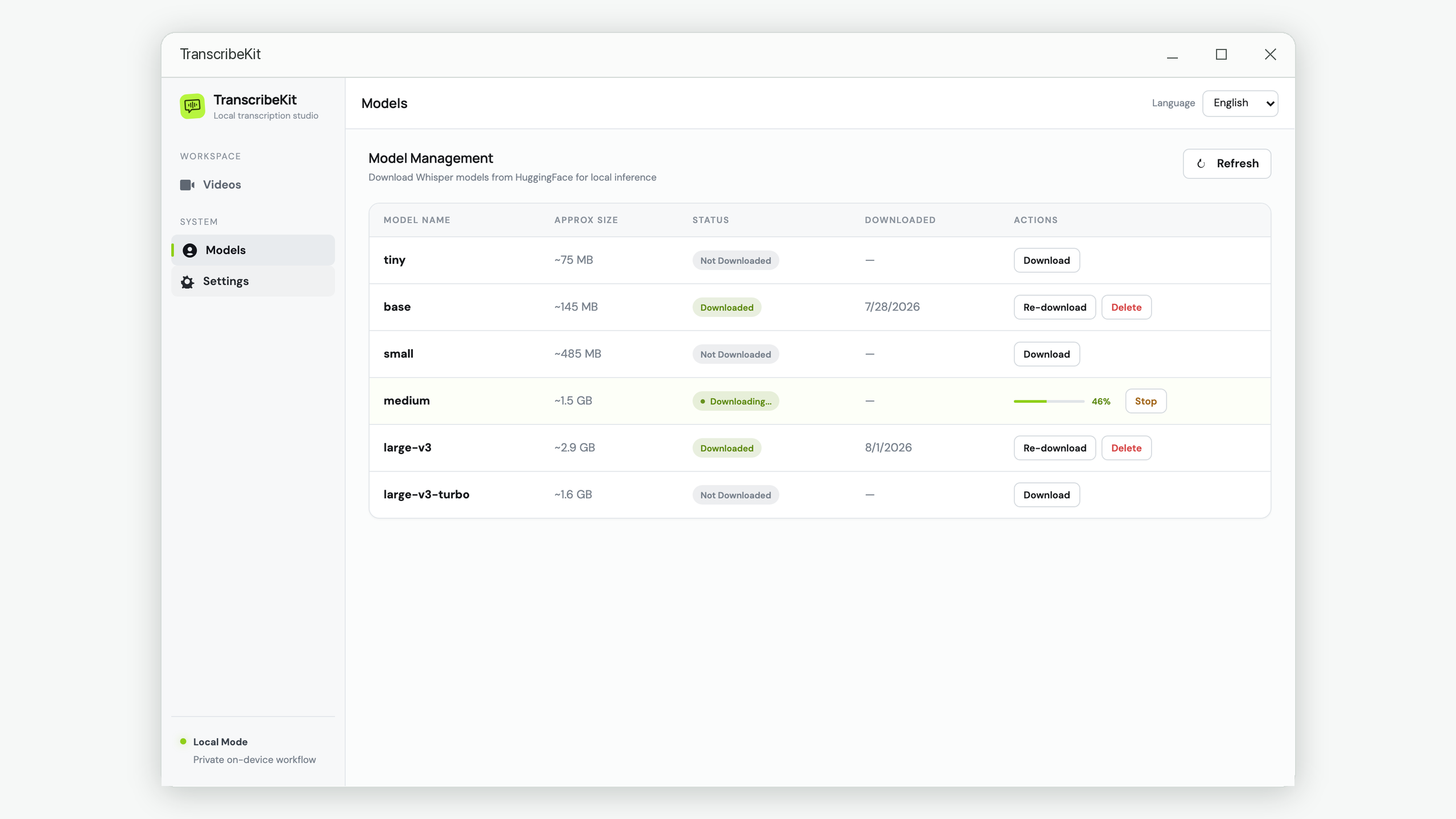
The first thing a local transcription app asks you is which model to download, which is an annoying question to face before you have transcribed anything. The names are unhelpful and the sizes span a factor of forty.
Here is the practical version, including the part most comparisons skip: for a lot of recordings, the big model is a waste of your time.
The short answer
Start with base. It is 145 MB, downloads in seconds, and tells you within one file whether your audio is clean enough that you never needed anything bigger. If the result disappoints, go to large-v3. Most people never need the models in between.
The lineup
| Model | Size | Relative speed | Accuracy on clear speech | Accuracy on difficult audio |
|---|---|---|---|---|
| tiny | ~75 MB | Fastest | Rough | Poor |
| base | ~145 MB | Very fast | Good | Weak |
| small | ~485 MB | Moderate | Very good | Fair |
| medium | ~1.5 GB | Slow | Excellent | Good |
| large-v3 | ~2.9 GB | Slowest | Excellent | Best available |
| large-v3-turbo | ~1.6 GB | Fast for its size | Excellent | Very good |
The speed column is relative, not absolute — actual times depend entirely on your CPU. On a typical laptop, transcribing one hour of audio ranges from a few minutes with base to comfortably over an hour with large-v3.
The insight that actually decides this
Model size matters far less than audio quality. A clearly recorded single speaker in a quiet room is transcribed nearly as well by base as by large-v3 — you may find a handful of differences across a whole hour, mostly in proper nouns.
Where the large models earn their size is precisely where small models fall apart:
- Accents away from the training distribution.
- Overlapping speakers and crosstalk.
- Background music, especially with vocals.
- Technical vocabulary and unusual proper nouns.
- Code-switching between languages mid-sentence.
- Low-bitrate or phone-quality audio.
So the question is not "how accurate do I want to be" — everyone wants maximum accuracy. It is "is my audio hard enough that a small model will fail on it". For clean studio-style recordings the honest answer is usually no.
Model by model
tiny — mostly skip it
Fast enough to feel instant and small enough to ignore, but the error rate is high enough that correcting the output costs more time than a better model would have taken. Useful for checking whether a file has usable speech at all, or for rough keyword search across a large archive. Not for a transcript anyone will read.
base — the right starting point
The best ratio in the lineup for typical content. Handles a clear single speaker well, runs fast on any machine, and downloads before you have finished reading this sentence. If your recordings are podcasts, talking-head videos, lectures or solo narration, this may be all you ever need.
small — the awkward middle
Meaningfully better than base on moderately difficult audio, but three times the size and noticeably slower. Worth it when base is almost good enough — a mild accent, some room echo — and you would rather not jump to a multi-gigabyte model.
medium — usually skip in favour of turbo
Excellent accuracy, but at 1.5 GB and slow inference it is largely superseded by large-v3-turbo, which is a similar size and both faster and more accurate. Keep it only if you have already downloaded it and are happy.
large-v3 — when accuracy is the whole point
The best transcript available, and the slowest way to get it. Use it for difficult audio, for material where errors carry real cost — legal, medical, published captions — and for languages other than English, where the gap over the small models is widest.
large-v3-turbo — the best default for demanding work
A distilled large model: close to large-v3 in accuracy, roughly half the size, and several times faster. For most people who need better than base, this is the model to reach for rather than medium or large-v3.
Matching the model to the job
| Your recording | Use |
|---|---|
| Podcast, solo narration, clear interview | base |
| Lecture or webinar with decent audio | base, or small if there is echo |
| Meeting with several speakers | large-v3-turbo |
| Strong accents or non-English | large-v3 |
| Background music or noisy location | large-v3 |
| Phone or video-call recording | large-v3-turbo |
| Legal, medical or published captions | large-v3 |
| Searching a large archive for keywords | tiny or base |
What about your hardware?
Two limits matter. Disk is straightforward — the sizes above are what each model occupies permanently. Memory is the one that bites: a large model needs several gigabytes of RAM while it runs. On a machine with 8 GB, large-v3 will work but will leave little room for anything else; large-v3-turbo is a much more comfortable fit.
Transcription here runs on the CPU, so a fast processor helps and having a discrete GPU does not. This is also why a large model on a laptop is genuinely slow rather than mildly slow — it is worth being realistic before starting a three-hour file overnight.
A method rather than a guess
Rather than agonising over the choice, test it on your own material:
- Take a representative two-minute clip of your typical recording.
- Transcribe it with base and read the result.
- If the only errors are proper nouns, stop — base is your model, and fixing a few names is faster than any larger model.
- If sentences are wrong or garbled, transcribe the same clip with large-v3-turbo and compare.
- Only if that is still not good enough, move to large-v3.
Two minutes of testing settles a question that is otherwise pure speculation, and it settles it for your audio rather than someone else's benchmark.
A note on benchmarks
Published word error rates are measured on standardised datasets of read speech. They are useful for ranking models against each other and nearly useless for predicting what you will get from a conference room recording with an air conditioner running. Trust the two-minute test over the leaderboard.
Try any model without a subscription
TranscribeKit downloads Whisper models on demand and runs them locally on Windows. Keep several, switch per file, delete what you do not need.
Get it from the Microsoft Store